Amazon ads for authors are pay-per-click ads that put your book in Amazon search results and on other books’ pages, and they only make sense once you know the most you can afford to pay for each sale. That figure is your break-even ACoS. It comes straight from your royalty, and two KDP changes have moved it: the 50% paperback rate below $9.99 (since June 2025) and the wider 70% eBook band up to $12.99 (since 7 July 2026). This guide works out your number first, then walks you through a first campaign in six steps.
Who this is for: self-published and traditionally published authors who have a finished book on Amazon and want to test ads without guessing. How we checked it: on 3 November 2026 we read KDP’s own help pages on eBook royalties, list prices, delivery costs, print royalties and printing costs, and Amazon Ads’ author guides, FAQ, moderation rules and announcements. Every rule and figure below links to the page it came from. Where Amazon’s own pages disagree, we say so.
What Amazon ads can and can’t do for a book
An Amazon ad buys a place in front of people who are already shopping for books. Someone searching “cosy mystery with a cat” is closer to buying than someone scrolling a social feed. But the ad only buys the look. Your cover, title, description, reviews and price decide whether that look turns into a sale.
If the product page doesn’t convert, more clicks just cost more. Before you spend, be honest about three things:
- The page. A cover that reads at thumbnail size, a description with a hook in its first line, and enough reviews that a stranger trusts it.
- The price. A $0.99 eBook earns about 35 cents a sale. There is almost no room in that for paid clicks unless the book leads into a series.
- The read-through. If book one sells book two, three and four, you can afford to pay more for the first sale. If it’s a standalone, the maths must work on one book.
Amazon ads for authors are one line in a wider plan. If you are still deciding what to spend overall, our guide to how much book marketing costs sets out the main budget lines, and our week-by-week launch plan shows where ads fit around launch day.
The ad types open to authors in 2026
KDP’s Amazon Ads help page lists two ad types for books: Sponsored Products and Sponsored Brands. Two newer routes sit beside them.
Sponsored Products
- Where it shows
- Search results and book pages on Amazon, Kindle and Goodreads
- Who can run it
- KDP and Author Central authors
- How you pay
- Per click
- Markets
- 12 KDP marketplaces
- Best first use
- Your first campaign
Sponsored Brands
- Where it shows
- Headline ad showing several books or a video
- Who can run it
- All authors, per Amazon Ads (6 Jun 2025); KDP help still says 3 titles
- How you pay
- Per click
- Markets
- KDP doesn't list them separately: check your console
- Best first use
- A series or author brand
Kindle lockscreen
- Where it shows
- Kindle e-reader lock screen
- Who can run it
- Self-service advertisers for eBooks, via Amazon DSP (24 Apr 2026)
- How you pay
- Amazon DSP open auction
- Markets
- US
- Best first use
- Wide eBook awareness
Audiobook ads
- Where it shows
- Sponsored Products and Brands placements, for Audible titles
- Who can run it
- Authors incl. ACX creators (28 Aug 2026)
- How you pay
- Per click
- Markets
- US only
- Best first use
- Books with an Audible edition
Which fits you Start with Sponsored Products; add Sponsored Brands once your console offers it and you have a series or video to show.
- Sponsored Products. Your cover and title appear in shopping results and on book pages. Amazon says these ads show on Amazon, Kindle and Goodreads. You pay per click. KDP authors can run them in 12 marketplaces: the US, Canada, Mexico, the UK, Germany, Italy, Spain, France, the Netherlands, India, Australia and Japan.
- Sponsored Brands. A banner-style ad with your own headline that can show several books or a video. Here Amazon’s pages conflict. Amazon Ads announced on 6 June 2025 that Sponsored Brands is now open to all authors, single-title authors included. KDP’s help page still says you need a pen name with three unique titles in Author Central, and Amazon’s best-practices guide for authors also says three or more. Your ads console shows what you can actually run.
- Kindle lockscreen ads. Since 24 April 2026, Kindle e-reader lockscreen placements can be bought through Amazon DSP’s self-service open auction, in the US, by self-service advertisers for their eBooks. The announcement doesn’t say whether the older console route has gone, so check yours.
- Audiobook ads. Since 28 August 2026, authors, including ACX creators, can run Sponsored Products and Sponsored Brands for audiobooks. US only, and you must claim your pen name in Author Central first.
Some guides list Sponsored Display as a standard author option. We found no Amazon page offering it to KDP authors, so we leave it out.
Work out your break-even ACoS first
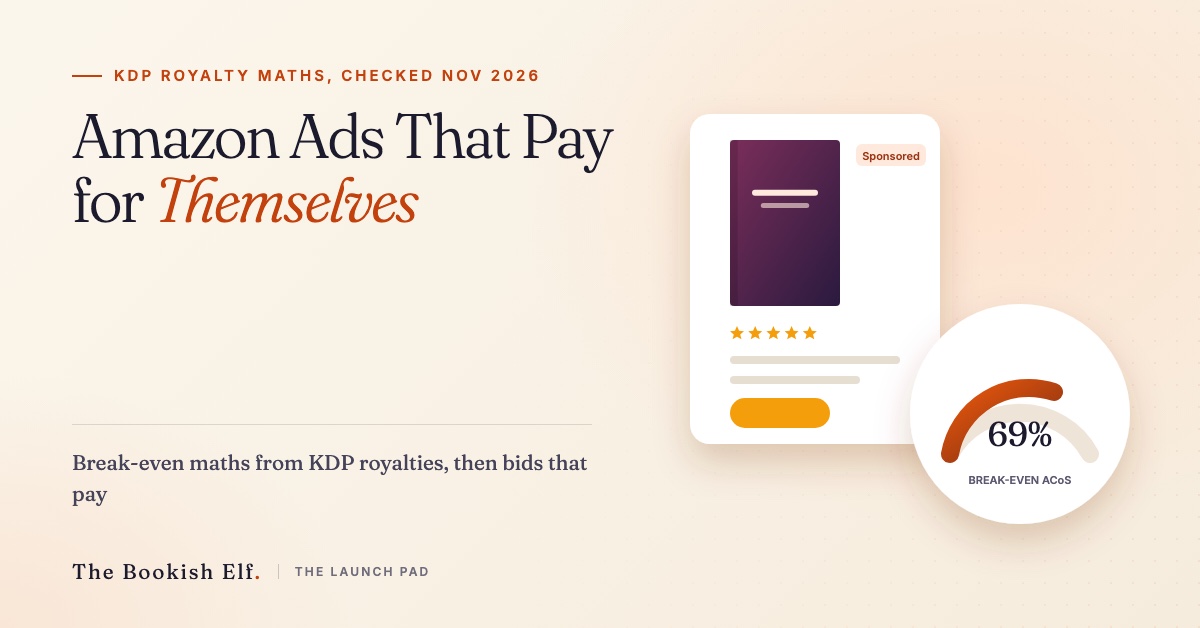
ACoS (advertising cost of sales) is ad spend divided by the sales those ads produced. Your break-even ACoS is the point where the ad cost of a sale equals the royalty you earn from it. Below it, each ad sale makes money. Above it, each one loses money. The formula is short: break-even ACoS = royalty per sale ÷ list price.
Break-even ACoS is royalty ÷ price: spend above it and each ad sale loses money. Check your own royalty and costs in your KDP Bookshelf before you set bids. Example inputs only.
KDP has two rates for each format and a price line that switches between them.
- eBooks. The 35% option pays 35% of list price. The 70% option pays 70% of list price after a delivery cost of $0.15 per megabyte on Amazon.com. On Amazon.com the 70% option now covers list prices from $2.99 to $12.99, effective 7 July 2026, up from $2.99 to $9.99. Your eBook must also be priced at least 20% below your print edition to qualify.
- Paperbacks. On Amazon.com KDP’s print royalty page pays 60% of list price at $9.99 and above, but only 50% at $9.98 and below. The printing cost is then taken off. KDP’s own example: a $15 paperback with 333 black-ink pages earns (0.60 × $15) − $5.00 = $4.00.
Use the calculator below with your own numbers. It opens on a $4.99 eBook at 70%; Paperback fills in $14.99, a 60% rate and a $3.40 print cost. That print cost is realistic: on KDP’s printing cost page, a regular-trim black-ink paperback of 110 to 828 pages costs $1.00 plus $0.012 a page in the US, so $3.40 is a 200-page book. The calculator does not change the rate for you. If your paperback is priced at $9.98 or less, type 50% in the royalty box. For an eBook on the 35% option, type 35% and set the delivery fee to zero, because the 35% option carries no delivery cost.
Here is the same maths worked out from KDP’s tables, using a 300-page regular-trim black-ink paperback (print cost $1.00 + 300 × $0.012 = $4.60) and a 2 MB eBook file (delivery 2 × $0.15 = $0.30).
| Format and price | KDP royalty maths | Royalty per sale | Break-even ACoS |
|---|---|---|---|
| eBook $0.99, 35% | 0.35 × $0.99 | $0.35 | 35% |
| eBook $4.99, 70% | 0.70 × ($4.99 − $0.30) | $3.28 | 65.8% |
| eBook $11.99, 35% (the only option before 7 July 2026) | 0.35 × $11.99 | $4.20 | 35% |
| eBook $11.99, 70% (possible from 7 July 2026) | 0.70 × ($11.99 − $0.30) | $8.18 | 68.2% |
| Paperback $9.98, 300 pages, 50% | 0.50 × $9.98 − $4.60 | $0.39 | 3.9% |
| Paperback $9.99, 300 pages, 60% | 0.60 × $9.99 − $4.60 | $1.39 | 14.0% |
| Paperback $14.99, 300 pages, 60% | 0.60 × $14.99 − $4.60 | $4.39 | 29.3% |
Look at the two paperback rows in the middle. One cent of list price, $9.98 against $9.99, more than triples the royalty and lifts the break-even ACoS from about 4% to 14%. A cheap paperback is very hard to advertise profitably. Now look at the $11.99 eBook. KDP’s page says your price and royalty option stay as they are unless you change them, so a book that sat on 35% before July doesn’t move to 70% by itself. Switching it roughly doubles the ACoS you can afford.
Two cautions. The console measures ACoS on what shoppers paid, which can differ from list price if Amazon discounts your print edition. And Kindle Unlimited page reads are extra income that ACoS ignores. Sponsored Brands has shown KENP page reads and estimated KU royalties in the dashboard since December 2023, so read your real figures there rather than guessing a per-page rate.
Get the book ready before you spend
Fix the page before you buy traffic for it. Check the cover at thumbnail size on a phone. Rewrite the first two lines of the description so they work even if the shopper reads nothing else. Check the cover against Amazon’s ad rules below; romance authors sometimes need a discreet edition. Claim your books in Author Central, and if you have an audiobook or a traditionally published title, claim that too, since KDP requires it for those ads.
Launch an automatic Sponsored Products campaign
Start with Sponsored Products on automatic targeting. Amazon’s author’s guide to Sponsored Products describes automatic targeting as Amazon matching your book to searches and books based on details such as genre, and suggests it for newcomers.
Advertise one book per campaign at first, ideally book one of a series.
Build manual keyword and product campaigns
Once the automatic campaign has run for about two weeks, open its search-term report. It shows the searches and the books that led to clicks and sales. Those are the raw material for a manual campaign.
- 1Auto campaign
Amazon matches your book to searches and books it thinks fit.
- 2Search-term report
After about two weeks, find the terms and books that produced sales.
- 3Manual campaign
Move proven terms into keyword targeting and proven books into product targeting.
- 4Negatives
Add terms that spent with no sales as negative keywords in the auto campaign.
- 5Review every two weeks
Raise bids under your break-even ACoS, lower them above it.
A manual campaign lets you choose your own targets in two ways. Keyword targeting bids on searches. Product targeting puts your ad on the pages of specific books. A good starter list has 20 to 30 targets drawn from three places:
- authors readers compare you to;
- specific comparable titles in your subgenre;
- genre and trope phrases readers actually type (“enemies to lovers fantasy”, “police procedural Scotland”).
Move terms that produced sales into the manual campaign. Add terms that spent money with no sales as negative keywords in the automatic campaign, so you stop paying for them twice.
Set bids and a budget you can live with
The Amazon Ads FAQ sets the minimum daily budget at $1.00 (or the local equivalent) for both Sponsored Products and Sponsored Brands. You set your own bid and pay only when someone clicks. When you first add a payment card, KDP places a $50 pre-authorisation hold to check it; you are charged only for what the ads spend.
Amazon’s author’s guide to Sponsored Products explains that the daily budget is averaged over a month. A $10 daily budget over 30 days caps spend at $300, though any one day can run higher or lower. It also offers three bidding strategies:
- Dynamic, down only: Amazon lowers your bid where a sale looks less likely. The safest start.
- Dynamic, up and down: Amazon can raise your bid by up to 100% for top-of-first-page placements and up to 50% elsewhere.
- Fixed: Amazon uses your exact bid.
To set a bid, use the calculator’s third figure: the most you can pay per click is your royalty multiplied by the share of clicks that buy. If you earn $4.39 a sale and one click in ten buys, a click is worth about 44 cents to you. Amazon doesn’t publish an average book click price, so we don’t print one.
Read the numbers after two weeks
Amazon’s own advice is to wait about two weeks after launch before trying more advanced bidding, then check in every two weeks. At each check, look at each keyword or product target and sort it into one of three groups:
- Below your break-even ACoS: profitable. Leave it or raise the bid a little.
- Above your break-even ACoS: losing money on each sale. Lower the bid, unless read-through or KU reads make up the gap.
- Clicks but no sales: after a fair number of clicks, pause it or add it as a negative.
Scale the winners and cut the rest
Raise budgets only on campaigns that sit under your break-even ACoS. Add Sponsored Brands once you have a series or a clear author brand to show, and try a video ad if you can make one. For seasonal pushes, Amazon’s best-practices guide suggests starting early and running campaigns for at least four to six weeks. Run separate campaigns per marketplace. Our guide to why a book ranks differently in each Amazon marketplace explains why.
If you would rather hand some of this off, The Bookish Elf sells marketing services to authors, so we have an interest here. Our book marketing services page lists what we offer; the steps above work just as well on your own.
Amazon’s rules for book ads
Every ad is reviewed before it runs. Amazon’s book ad moderation guide says reviewers check three things: the book’s content, its cover, and any custom text or headline. A book being on sale doesn’t make it eligible to advertise.
Amazon reviews the book, the cover and your ad text. Covers should sit at about a PG-13 level. Ad text can't include customer reviews, prices, or unsupported claims or guarantees. Approval usually takes 24 hours and can take three business days. Source: Amazon Ads, Book ad moderation and approval, read 3 Nov 2026.
- Covers: no undressing, lingerie, provocative embraces or sexual innuendo. Amazon’s rough test is that a cover suitable for a PG-13 rating or below is likely to be accepted.
- Restricted topics get closer review: adult content, drugs, gambling, politics, religion, romance, self-help and weight loss.
- Custom text must be accurate and match the landing page, use correct grammar and capitals, and must not include customer reviews, prices, unsupported claims or guarantees, or disguised swear words. Write it in the language of the Amazon site it appears on.
- Timing: approval usually takes 24 hours and can take up to three business days. If an ad is rejected, edit the text and resubmit, or change the cover image if that was the issue.
What changes for Amazon ads in 2027
Most of what will shape Amazon ads for authors next year is already announced. Each point says what is fact and what is our expectation.
Now (2026)
eBooks priced $10 to $12.99 can earn 70% if you switch the option yourself.
KDP, effective 7 Jul 2026Sponsored Products and Brands for Audible titles, US only.
Amazon Ads, 28 Aug 2026Kindle lock-screen placements bought in Amazon DSP.
Amazon Ads, 24 Apr 2026Next (2027)
Creative Agent builds video and display ads at no cost in the US. More author video ads is our expectation.
Amazon Ads, 11 Nov 2025 (expectation is ours)Kindle Translate covers five languages to and from English, so more editions may be worth an ad.
About Amazon, updated 30 Jun 2026Watch
US only today. Other markets may follow.
SpeculationThe older author-console route may close now that DSP sells it.
Speculation- Re-price eBooks in the $10 to $12.99 band (fact). The 70% band reached $12.99 on 7 July 2026, but books don’t switch on their own. Expect more authors to price full-length eBooks in that band, and to advertise them harder, because the break-even ACoS roughly doubles.
- Audio becomes an ad format (fact, US only). Since 28 August 2026 you can advertise Audible editions next to Kindle and print. Our audiobook marketing guide covers the rest of an audio launch. Whether audiobook ads reach other countries in 2027 is speculation; Amazon hasn’t said.
- AI-made ad creative (fact, plus our expectation). Amazon’s Creative Agent, announced in November 2025 for the US, builds display, video and audio ads at no cost, and Sponsored Brands already offers a free AI image generator. Our expectation, not Amazon’s statement: more authors will run video ads in 2027 because making them is no longer the barrier. The moderation rules still apply.
- Lockscreen moves into DSP (fact). Lockscreen ads have been bought through Amazon DSP since April 2026. Speculation: the separate route in the author console may disappear.
- The $9.99 paperback line stays (fact). The 50% rate below $9.99 makes ads on cheap paperbacks hard to fund, and it will keep pushing print prices up.
For the wider picture beyond Amazon, see our guide to book marketing trends for 2027.
FAQ about Amazon ads for authors
How much do Amazon ads cost for a book?
You choose. The minimum daily budget is $1.00 for Sponsored Products and Sponsored Brands, you set your own bid, and you pay only when someone clicks. KDP places a temporary $50 hold to check your card, which is not a charge.
Are Amazon ads worth it for a single book?
They can be, if the price leaves room. Work out your break-even ACoS first: a $14.99 paperback or a $4.99 eBook on 70% leaves far more room than a $0.99 eBook or a paperback under $9.99.
Can traditionally published authors run Amazon ads?
Yes. KDP’s help page says traditionally published titles can be advertised in the US, UK, Germany, Italy, Spain, France, Canada and Australia once you claim them in Author Central.
Do Amazon ads count Kindle Unlimited page reads?
Not in ACoS, which only counts sales. Sponsored Brands has shown KENP page reads and estimated KU royalties in the dashboard since December 2023. If your book is in KU, add that income before you judge a campaign.
How long before Amazon ads start working?
Amazon usually approves an ad within 24 hours, and it can take up to three business days. Amazon suggests waiting about two weeks before changing bids, then reviewing every two weeks.
Put your book in front of readers
Our book marketing services pair your launch with reviews, features and social promotion on The Bookish Elf.
See our book marketing services